
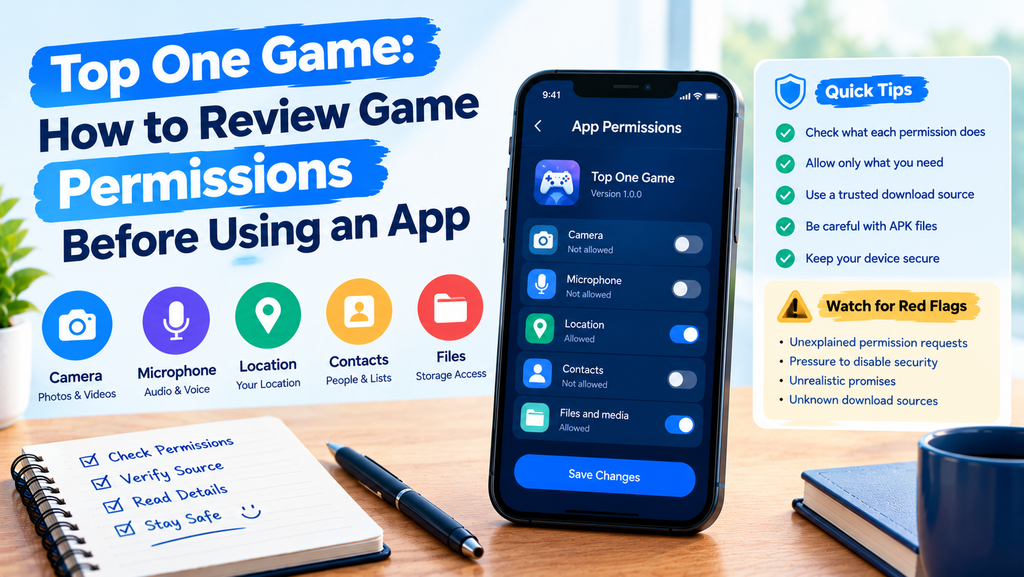
Installing a mobile game is only the first step. Before using it, you should understand what the app can access on your phone. Some permissions may support useful features, while others may not be needed for the way you use the game.
When installing Top One Game or another gaming app, take a moment to review its permission requests. This small check can help you protect personal information, reduce unwanted access, and make better choices about your device.
The same approach applies to topone, topone game, and apps installed through an APK file. Here is how to review permissions in a simple and practical way.
What Are App Permissions?
App permissions control which parts of your phone an application can access. Depending on the permission and your device, an app may request access to your camera, microphone, contacts, location, photos, or notifications.
Not every game needs every type of access. A permission may support a specific feature, but that does not mean you must approve every request without checking it.
Before allowing access, ask yourself three questions:
- What feature needs this permission?
- Does the feature make sense for this game?
- Can I use the app without granting access?
These questions help you decide whether a request matches the app’s purpose.
Understand the Most Common Permission Types
1. Camera and Microphone Access
The camera and microphone allow apps to capture images, video, or sound. These permissions may be useful for games with camera-based features, voice chat, or recording tools.
However, a basic game may not need them for ordinary use. If you cannot see a clear reason for the request, check the app’s help information before allowing access.
You can usually change these permissions later through your phone’s settings.
2. Photos, Videos, and File Access
Some apps request access to photos or files to support uploads, saved images, or other functions. The exact options depend on your Android version and the app.
When available, choose limited photo access instead of giving an app access to your entire gallery. If the game does not need to open or save files, consider whether the permission is necessary.
For topone apk installations, review file-related access carefully. Installing an APK does not automatically mean the app needs broad access to your device’s files.
3. Location Access
Location permission can reveal information about where your phone is located. Some apps use it for location-based features, but many games do not need precise location access.
If an app requests location access, check whether its features actually depend on it. If not, deny the request or select a more limited option when your phone provides one.
Avoid sharing location information just because a pop-up makes the request look routine.
4. Contacts and Phone Permissions
Contacts access can allow an app to read information about people saved on your phone. Phone-related permissions may expose certain device or call information, depending on the permission involved.
These requests deserve extra attention because they can involve information about you and other people.
If a game does not clearly explain why it needs access to contacts or phone features, do not grant permission simply to move past the prompt.
How to Review Permissions on Android
You can check app permissions through Android settings. The names of menus may vary slightly by phone brand and operating system version.
Check Permissions for One App
Follow these general steps:
- Open your phone’s Settings.
- Select Apps or Applications.
- Find the game you want to review.
- Open its app information page.
- Select Permissions.
- Review the allowed and denied permissions.
- Change any permission that is not needed.
Some Android phones also let you review permissions by category. For example, you may see which installed apps can access the microphone or location.
After changing a permission, open the game and check whether its main features still work. If a feature stops working, decide whether you actually need it before granting access again.
Review Permissions Before Installing an APK
An APK is an Android application package used to install an app. Installing one from outside an official app store requires extra care because the source and file may be harder to verify.
Before installing a top one apk file, follow these checks.
Verify the Download Source
Use a source you can trust. Be cautious of websites that offer modified versions, promise hidden features, or ask you to install several unrelated files.
A familiar app name does not prove that a file is genuine. Check the publisher details and available security information before continuing.
Read the Permission Details
Review any permission information shown during installation or in the app’s settings after installation. Look for requests that seem unrelated to the game’s stated purpose.
Do not assume an APK is safe simply because it installs successfully. Installation only shows that the package could be installed; it does not guarantee that the app is trustworthy.
Avoid Disabling Security Features
If a website tells you to turn off your phone’s security protections to install its file, treat that request as a warning sign. Do not follow instructions you cannot verify.
For a top one game download, choose a trustworthy distribution source and avoid unnecessary installation steps.
Warning Signs You Should Not Ignore
Some permission requests deserve a closer look, especially when the app gives little explanation.
Watch for these signs:
- A game requests contacts access without explaining why.
- A simple feature asks for microphone or camera access unexpectedly.
- A website tells you to disable device security.
- The app requests broad file access without a clear purpose.
- A pop-up pressures you to approve every permission immediately.
- The download page makes unrealistic promises about rewards or benefits.
One unusual request does not prove that an app is harmful. Still, you should pause and investigate instead of accepting it automatically.
Make Permission Reviews a Regular Habit
Permission settings can change when apps receive updates or when you start using new features. Reviewing them from time to time helps you stay aware of what your installed apps can access.
Try this simple routine:
- Check permissions after installing a new game.
- Review access again after major updates.
- Remove permissions for features you no longer use.
- Uninstall apps you no longer need.
- Keep Android and your security tools updated.
- Avoid downloading files from unfamiliar websites.
You do not need to check every setting every day. A quick review after installation and occasional follow-ups are practical starting points.
Final Thoughts
App permissions are an important part of mobile security. They determine what information and features a game can access, so each request deserves a little attention.
Before using Top One Game, review its permissions, check the source of your download, and allow only the access that makes sense for the features you want to use. The same care applies to topone game download files and other Android apps.
A few careful choices can help you keep better control of your phone without making everyday gaming more complicated.
Frequently Asked Questions
1. Are app permissions important for mobile games?
Yes. Permissions control access to features and information such as the camera, microphone, location, and files. Reviewing them helps you make informed choices.
2. Can I change game permissions after installation?
Yes. On most Android phones, open Settings, select Apps, choose the game, and open Permissions. Available options depend on your device and Android version.
3. Should I allow every permission a game requests?
No. Allow a permission when it supports a feature you understand and want to use. If the reason is unclear, investigate before approving it.
4. Is every APK file safe to install?
No. An APK can come from a trustworthy or untrustworthy source. Check the publisher and download source, review requested permissions, and keep your device’s security protections enabled.
5. What should I do if a game requests an unusual permission?
Deny it for now, if possible, and check the app’s official information or support resources. If the request remains unexplained, consider avoiding the app.